How to model Maven project structures
JEAF Generator can not only be used to generate Java code based on UML models; it can also generate complete POM files, including dependencies, for multi-module Maven projects.
Whenever you work with model-driven approaches, you can ensure that your model and your code remain consistent. This benefit becomes especially valuable at the architectural level, where managing dependencies is one of the most important aspects.
However, if you model dependencies in a UML model and do nothing further with that information, your model will quickly become outdated. If, on the other hand, you also use this information to keep your Maven POMs up to date, such inconsistencies can easily be avoided.
In addition, generating POMs helps keep them clean and enables updates to be rolled out across multiple projects with minimal effort.
Maven Projects
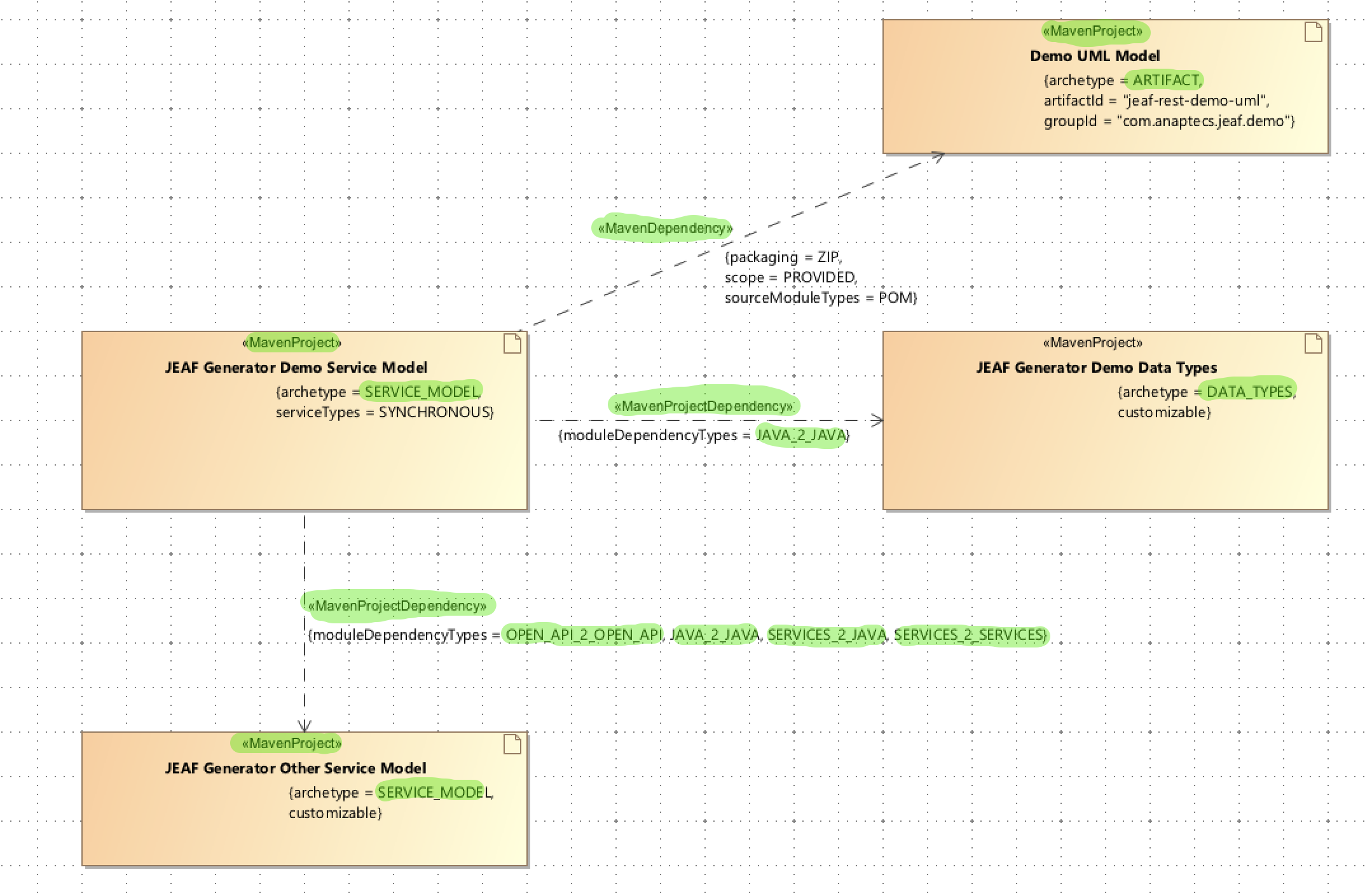
Maven projects are represented as so-called «Artifact» in the UML model. As in other cases, the UML standard metamodel does not support adding all the required information. Therefore, an additional stereotype, «MavenProject», is introduced.
This stereotype can be used to define Maven-specific information for an artifact. Based on the provided information, JEAF Generator is then able to generate Maven project structures from the UML model.
Dependencies
There is hardly ever a project that is completely isolated and does not rely on other libraries, frameworks, or similar components. Therefore, defining and managing dependencies is one of the most important aspects of a Maven project.
Within the context of Maven projects, the following types of dependencies exist:
- Artifact Dependencies (stereotype
«MavenDependency») This is the “classic” dependency most people think of when talking about dependencies. This type is used to express that your project depends on another artifact. It is intended to be used for dependencies from a Maven project to a specific Maven artifact. - Project Dependencies (stereotype
«ProjectDependency») This type can be used to easily express dependencies within multi-module projects. In such cases, it is necessary to define between which modules the dependencies actually exist. - Parent POM Dependency (stereotype
«MavenParentPOM») As the name implies, this type can be used to define a parent POM dependency for a Maven project.
All of the types listed above can be defined in the UML model.
Example
Advanced Mechanisms
Naming Pattern Mechanism
In many cases, naming conventions are defined for elements within Maven projects, such as the group ID and artifact ID. Of course, it is possible to define all relevant information for a Maven POM explicitly in the UML model. However, this is not very convenient and may also be somewhat error-prone.
To simplify this, JEAF Generator supports the definition of naming conventions as patterns, which are then automatically applied during POM generation.
Currently, naming patterns can be defined for the following elements:
- Group ID
- Artifact ID
- SCM path
- Version property name
The pattern mechanism itself is simple but sufficient for almost all use cases. A naming pattern consists of static text elements and variables that are dynamically replaced during code generation.
Example:
- For the SCM path, the following pattern might be defined:
https://github.com/anaptecs/$[PROJECT_ARTIFACT_ID]In this case, the actual artifact ID will be used in the SCM path definitions within the generated POM file.
The table below defines the variables that can be used in pattern definitions.
| Variable | Description |
|---|---|
$[PROJECT_NAME_MAVEN] |
Name of the Maven project as defined in the UML model, converted to lower case. All spaces are replaced with -. Example:- If the project name in the UML model is JEAF Timetable Demo API, the value of this variable will be jeaf-timetable-demo-api. |
$[PROJECT_PACKAGE_NAME] |
Name of the package in which the Maven project is located. The variable contains only the package name itself, not its parent packages.Example:- If the project is located in the package com.anaptecs.jeaf.demo, the value of this variable will be demo. |
$[PROJECT_PACKAGE_NAME_FQN] |
Fully qualified name of the package in which the Maven project is located.Example:- If the project is located in the package com.anaptecs.jeaf.demo, the value of this variable will be com.anaptecs.jeaf.demo. |
$[PROJECT_ARCHETYPE] |
Literal name of the project’s archetype, e.g., SERVICE_MODEL. |
$[PROJECT_ARCHETYPE_NAME] |
Human-friendly name of the project’s archetype, e.g., Service Model. |
$[PROJECT_ARCHETYPE_JAVA_SUFFIX] |
Java suffix of the project’s archetype, e.g., ServiceModel. |
$[PROJECT_ARCHETYPE_MAVEN_SUFFIX] |
Maven suffix of the project’s archetype, e.g., servicemodel. |
$[PROJECT_ARTIFACT_ID] |
The project’s artifact ID. |
$[PROJECT_GROUP_ID] |
The project’s group ID. |